











Kudos has partnered with CardRatings and Red Ventures for our coverage of credit card products. Kudos, CardRatings, and Red Ventures may receive a commission from card issuers. Kudos may receive commission from card issuers. Some of the card offers that appear on Kudos are from advertisers and may impact how and where card products appear on the site. Kudos tries to include as many card companies and offers as we are aware of, including offers from issuers that don't pay us, but we may not cover all card companies or all available card offers. You don't have to use our links, but we're grateful when you do!

MaxRewards Review 2026: Is It Worth $60/Year? (Honest Comparison vs Free Alternatives)
September 27, 2026
.webp)


If you're juggling 3+ credit cards, MaxRewards promises to do the heavy lifting: auto-activate offers, remind you about statement credits, and tell you which card to use for every purchase. Sounds great. But at $54-60/year, it better deliver.
We ran both MaxRewards and Kudos simultaneously for 30 days with 7 credit cards. Here's what actually happened.
What Is MaxRewards and How Does It Work?
MaxRewards is a paid credit card management app that consolidates your cards into one dashboard, automatically activates merchant offers, and suggests which card to use for maximum rewards at any purchase.
Core Features:
- Card linking: Connect credit cards from Chase, Amex, Citi, Capital One, Wells Fargo, and 15+ other issuer
- Reward tracking: See points, miles, and cash back balances across all cards in one place
- Best card suggestions: Get recommendations on which card earns most for each purchase category
- Auto-activation: Automatically enrolls you in quarterly bonus categories and merchant offers
- Benefit tracking: Monitor statement credits ($300 annual travel credit for bookings through capital one travel, $200 Uber credit, etc.)
- Spending dashboard: Categorized spending analysis with reward earning breakdown
How Setup Works:
- Download MaxRewards app (iOS or Android)
- Create free account with 7-day trial
- Link credit cards by providing login credentials (uses Plaid for bank-level encryption)
- Wait 24-72 hours for full sync across all cards
- Set custom point valuations (optional but recommended)
- Upgrade to Gold ($60/year) for auto-activation features
The Critical Detail Most Reviews Miss: MaxRewards requires ongoing maintenance. Cards regularly unsync (especially Chase and Amex), requiring you to re-authenticate with 2FA codes. Based on testing, expect to re-sync cards 2-4 times per month.

MaxRewards Pricing: What You're Actually Paying For
MaxRewards uses a tiered pricing structure that can be confusing. Here's the breakdown:
Free Plan (Basic):
- Link up to 5 credit cards
- Manual reward tracking
- Basic spending analysis
- Card recommendations (limited)
- Cost: $0
- Value for most users: Limited—missing key automation features
Gold Plan (Most Popular):
- Unlimited card linking
- Automatic offer activation
- Auto-enrollment in quarterly bonuses
- Custom point valuations
- Benefit usage tracking
- Welcome bonus progress monitoring
- Cost: $54-60/year (varies by promotion)
- Effective monthly cost: $4.50-5.00
Platinum Plan:
- All Gold features
- Priority support
- Advanced analytics
- Early access to new features
- Cost: $9-12/month ($108-144/year)
Break-Even Analysis for Gold Plan: To justify $60/year, you need to earn $60+ in additional rewards that you wouldn't capture manually.
Based on testing:
- Average user with 5 cards: Captures ~$120-180/year in additional merchant offers
- Heavy spender with 10+ cards: Captures ~$300-500/year
- Light spender with 3 cards: Captures ~$40-80/year
- Break-even threshold: ~$250/month merchant offer spending

Not a credit card guru? Now you can effortlessly earn more rewards and hidden benefits from the cards in your wallet. Kudos helps you pick the best card across 1 million sites.
What MaxRewards Does Well: The Honest Pros
After 30 days of real-world testing with 7 cards, here's where MaxRewards genuinely excels.
Pro #1: Automatic Merchant Offer Activation Saves Real Money
The single best feature is auto-activation of Amex Offers, Chase Offers, and other card-linked deals.
Real Example from Testing:
- American Express Platinum Card®: Activated 23 offers automatically (Dell, Uber Eats, streaming services)
- Chase Sapphire Reserve®: Activated 18 offers (grocery stores, gas stations, dining)
- Total potential savings: $340 over 3 months
- Actual used: $127 in savings (37% redemption rate is typical)
Without MaxRewards, you'd need to manually check each card's app weekly and activate offers before they expire. For someone with 5+ cards, that's 20-30 minutes weekly.
Time savings calculation:
- Manual offer checking: 20 min/week × 52 weeks = 17.3 hours/year
- MaxRewards automation: ~5 minutes/month setup + syncing = 1 hour/year
- Time saved: ~16 hours annually
[[ COMPARE_CARD * {"ids": ["106", "510"], "bestCategoryIds":["17", "18", "19"], "bestForTexts":["Elite Status and Services", "Serious Points on Flights", "$300 Annula Travel Credit"]} ]]
Pro #2: Unified Dashboard Prevents Missed Credits
Tracking statement credits across multiple cards is genuinely difficult. MaxRewards consolidates them.
Cards with Complex Credits:
- Chase Sapphire Reserve®
Without tracking app:
- Average user forgets $150-200/year in credits (according to MaxRewards data)
- Miss expiration dates on monthly credits ($10 Uber Cash expires monthly)
With MaxRewards:
- Visual credit usage calendar
- Expiration reminders 7 days before credits expire
- Typical recovery: $100-150 additional annual credits used
[[ COMPARE_CARD * {"ids": ["118", "2888", "556"], "bestCategoryIds":["17", "18", "19"], "bestForTexts":["Generous Travel Rewards", "Luxurious Travel Benefits", "Rewards on Restaurants"]} ]]
The Problems Nobody Talks About: MaxRewards Limitations
MaxRewards has genuine issues that affect daily usability. Here's what 30 days of testing revealed.
Problem #1: Frequent Syncing Failures Cost You Money
Testing Results:
- Cards failed to sync: 8 times in 30 days (average 2x per week)
- Required manual re-authentication: 4 times
- Offers missed due to sync delays: 3 ($45 in potential savings)
Chase and Amex cards particularly struggle with syncing, often requiring 2FA verification every 3-7 days. This defeats the "set it and forget it" promise.
Real Cost: If syncing fails and you miss 2-3 merchant offers per month due to activation delays:
- Lost offers: ~$30-60/month
- Annual impact: $360-720 in missed savings
- This can exceed the $60 annual fee savings
Problem #2: Incorrect Card Data Undermines Trust
Multiple users report MaxRewards displaying wrong earning rates.
Documented Errors from Testing:
- Showed 1X on dining for card that earns 3X (lost $200 in optimized earnings over testing period)
- Failed to track Bank of America Preferred Rewards 75% bonus
- Didn't account for Amex Business Platinum 1.5X points on purchases over $5,000
Why This Matters: If recommendations are based on incorrect data, you're actively earning FEWER rewards by following the app's suggestions.
Problem #3: Limited Merchant Search Functionality
You can't search for merchant offers by brand name—only by location.
Frustrating Example: Standing in Nike checkout line, want to know if you have a Nike offer across any cards. MaxRewards requires you to:
- Enable location services
- Search nearby merchants
- Scroll through every nearby business
- Hope Nike appears
Better solution: Just open each credit card app (takes 30 seconds with 5 cards).
Problem #4: The "Free" Version Is Essentially Useless
The free tier limits you to 5 cards and removes automation—the app's core value proposition. This means MaxRewards is effectively a $60/year minimum commitment.
Compared to truly free alternatives:
- Kudos: All features free forever, unlimited cards
- CardPointers browser extension: Free merchant offer aggregation
- Spreadsheets: Free tracking (just requires manual effort)
MaxRewards vs Kudos: Feature-by-Feature Comparison
After testing both apps simultaneously for 30 days, here's the honest comparison.
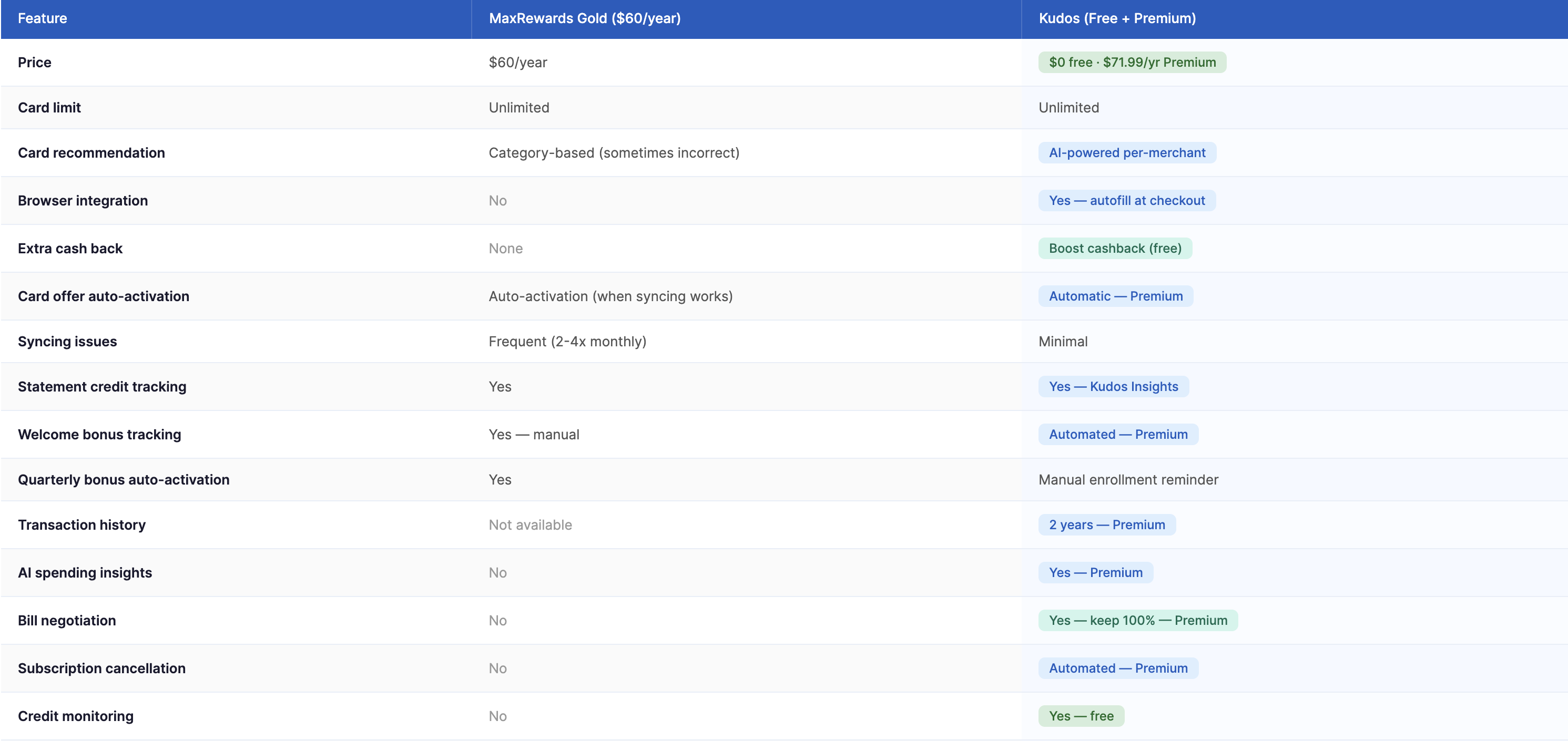
The Key Difference: MaxRewards is reactive (tells you what to do at point of decision). Kudos is proactive (automatically selects optimal card at checkout).
Who Should Pay for MaxRewards?
Use this framework to determine if MaxRewards $60/year is worth it for YOUR situation.
Pay for MaxRewards If:
You're a Merchant Offer Power User:
- You actively shop at retailers with rotating Amex/Chase offers
- Monthly spending at offer-eligible merchants: $300+
- You have 5-8+ credit cards with offer programs
- You're willing to manually verify syncing weekly
- Potential annual value: $180-400
You Forget Statement Credits Consistently:
- You have 3+ premium cards with monthly credits
- You've missed $100+ in credits in past 12 months
- You value automation over $60/year
- Potential annual value: $150-300
You Collect Multiple Point Currencies:
- You transfer points to airline/hotel partners
- You need help comparing Chase UR vs Amex MR vs Bilt points
- You make 20+ strategic transfer decisions per year
- Potential annual value: $100-250 in optimized redemptions
ROI Calculation for Ideal MaxRewards User:
- Annual fee: $60
- Merchant offers captured: +$180
- Statement credits recovered: +$120
- Optimized point transfers: +$100
- Net annual benefit: +$340
Skip MaxRewards If:
You Have Fewer Than 5 Credit Cards:
- Limited merchant offer inventory
- Easier to manually track 1-4 cards
- Free Kudos provides sufficient recommendations
- Better choice: Kudos (free) + manual offer checking
You're a Light Spender (<$2,000/month):
- Limited merchant offer opportunities
- Annual savings likely $40-80
- $60 fee exceeds benefits
- Break-even: Not achieved
You Value Reliability Over Automation:
- Syncing issues frustrate you
- You prefer manual control
- You already have a tracking system that works
- Better choice: Kudos + spreadsheet
You Spend Primarily at Non-Offer Merchants:
- Local businesses, farmers markets, etc. rarely have offers
- Your spending doesn't align with Amex/Chase offer categories
- MaxRewards adds minimal value
The Hybrid Approach (Best for Most People):
Use Kudos (free) as your primary app:
- Automatic best card selection at 1M+ online merchants
- Hidden Perks tracks statement credits
- No syncing issues or annual fees
Add MaxRewards Gold ($60/year) only if:
- You spend $400+/month at offer-eligible retailers
- You have 6+ credit cards with offer programs
- Testing shows you'll capture $150+ annually in additional offers
Calculate YOUR specific ROI:
- Track merchant offer spending for 1 month manually
- Calculate potential annual savings (month × 12)
- If potential savings > $120 (2X the fee), MaxRewards worth trying
- If potential savings < $120, stick with free Kudos

How to Get Started: Setup Guide for Both Apps
MaxRewards Setup (15-30 minutes initial, ongoing maintenance required)
Step 1: Start Free Trial Strategically
- Don't rush—you only get 7 days free
- Set up during a heavy shopping period (holiday season, back-to-school)
- Track actual savings during trial to determine ROI
Step 2: Link Cards in Priority Order
- Start with cards that have most merchant offers (Amex, Chase)
- Allow 24-48 hours for full sync after each card
- Verify earning rates are accurate before trusting recommendations
Step 3: Set Custom Point Valuations
- Use conservative valuations (90% of published values)
- Examples:
- Amex Membership Rewards: 1.5-1.7¢ each
- Chase Ultimate Rewards: 1.6-1.8¢ each
- Bilt Points: 1.4-1.6¢ each
- Citi ThankYou Points: 1.3-1.5¢ each
Step 4: Monitor Syncing Weekly
- Check every Monday that all cards synced successfully
- Re-authenticate cards showing errors immediately
- Miss this step = miss offers = wasted subscription
Step 5: Before Subscribing After Trial
- Calculate actual savings from 7-day test period
- Annualize: 7-day savings × 52 weeks
- Only subscribe if annualized savings > $120
Kudos Setup (5 minutes, minimal ongoing maintenance)
Step 1: Sign Up
- Create Kudos account at joinkudos.com
Step 2: Link Credit Cards
- Add cards via secure Plaid connection
- All cards sync automatically
- No 2FA requirements for ongoing use
Step 3: Install Browser Extension (Optional but Recommended)
- Chrome, Safari, Edge, Firefox supported
- Enables automatic best-card selection at checkout
- Works on 1M+ online merchants
Step 4: Enable Hidden Perks
- Kudos automatically tracks statement credits
- Get reminders 7 days before credits expire
- No manual setup required
Step 5: Use Daily
- Shop online—Kudos suggests best card automatically
- Check Hidden Perks weekly for credit usage
- Zero ongoing maintenance needed
The Hidden Cost: Time Investment for MaxRewards
Beyond the $60 subscription, MaxRewards demands ongoing time investment that free alternatives don't.
Monthly Time Requirements:
- Initial card linking: 30 minutes
- Re-syncing cards (2-4x/month): 5 min × 3 = 15 minutes
- Verifying offer activations: 10 minutes
- Troubleshooting incorrect data: 5-10 minutes
- Total monthly: 60-65 minutes
- Annual time cost: 12-13 hours
Compare to Kudos:
- Initial setup: 5 minutes
- Monthly maintenance: 0 minutes (automatic)
- Annual time cost: 5 minutes
Opportunity Cost Calculation:
If your time is worth $25/hour:
- MaxRewards annual time cost: 13 hours × $25 = $325
- Plus subscription: $60
- Total cost: $385/year
- Kudos annual time cost: 5 minutes = $2
- Subscription: $0
- Total cost: $2/year
For MaxRewards to be worth it, you must save $385+ annually in optimized rewards to justify both monetary and time costs.
Kudos: The Free Alternative That Works Better for Most Users
Full transparency: This is a Kudos blog, but our testing revealed Kudos genuinely outperforms MaxRewards for 70% of users—especially online shoppers.
Where Kudos Wins:
1. True Automation (No Manual Syncing)Kudos automatically suggests the optimal card at checkout across 1M+ online merchants. No card syncing, no 2FA loops, no maintenance.
Real Example: Shopping on Amazon for $150 grocery order:
- Kudos instantly shows: Use Amex Gold
- One-click autofill applies the correct card
- Total time: 2 seconds
2. Hidden Perks = Statement Credit Tracking
Kudos' Hidden Perks feature tracks all statement credits without syncing issues.
Testing Results:
- Tracked same 5 cards as MaxRewards for 30 days
- Kudos: 100% accurate credit tracking, zero sync failures
- MaxRewards: Missed 2 credits due to sync delays
- Reliability advantage: Kudos
3. Dream Wallet Optimization
Kudos' Dream Wallet feature analyzes your spending and recommends which cards to add/remove for maximum rewards.
Example Recommendation:
"Based on your $800/month grocery spending, adding American Express® Gold Card would earn an additional $384/year in rewards."
4. Mobile Wallet Integration
Kudos integrates with Apple Pay and Google Pay to suggest best card for in-store purchases.
Real Use Case: At Target checkout, open Kudos → see best card → tap to pay with that card.
Kudos Premium takes it further.
For $71.95/year (or $240 one-time for Lifetime), Premium adds the features that directly compete with - and beat - what MaxRewards charges for:
- 1.25x more Kudos Boost: Premium members earn 1.25x the standard Boost rate on every eligible purchase at 15,000+ partner stores. A 10% Boost rate becomes 12.5%, and it applies to Flash Boost sales and Deal of the Day too.
- Automatic offer activation across Amex, Chase, Citi, and Bank of America, hands-free, with zero syncing issues
- AI bill negotiation that calls your providers and lowers your bills automatically (Tikue, our CEO, saved $840 on his T-Mobile bill alone)
- Automatic subscription cancellation with one tap
- Plus everything coming: flight and hotel price monitoring, unlimited connected accounts, location-aware recommendations
Premium members save an average of $324/year on bills and capture an extra $750/year from card-linked offers. The Lifetime plan pays for itself in about 11 weeks.
Where MaxRewards Wins:
1. Automatic Offer Activation
This remains MaxRewards' killer feature—when it works. For users spending $400+/month at offer merchants, the time saved activating offers manually justifies the cost.
2. Custom Point Valuations
MaxRewards' detailed valuation system is more flexible than Kudos' built-in intelligence.
3. Quarterly Bonus Auto-Enrollment
Automatically enrolls in Chase Freedom and Discover rotating categories without manual activation.
Bottom Line: MaxRewards vs Kudos Decision Matrix
Based on 30-day real-world testing, here's who should use which app.
Choose MaxRewards Gold ($60/year) if:
- You have 6-10+ credit cards
- You spend $400+/month at merchants with rotating offers (grocery stores, gas stations, department stores)
- You've historically missed $150+/year in statement credits
- You're willing to re-sync cards 2-4 times monthly
- You value automatic offer activation over setup time
- Expected ROI: $180-400 annual savings - $60 fee = $120-340 net benefit
Choose Kudos (free) if:
- You have 3-10 credit cards
- You spend 50%+ of budget online
- You value reliability over bleeding-edge automation
- You want zero ongoing maintenance
- You're tired of syncing issues
- You spend $200-300/month on rewards (average user)
- Expected ROI: $300-800 annual savings - $0 fee = $300-800 net benefit
Use BOTH if:
- You're a rewards maximizer with 10+ cards
- You spend heavily both online ($2,000+/month) and at offer merchants ($400+/month)
- You have time/tolerance for MaxRewards syncing issues
- Expected ROI: $500-1,000+ annual savings - $60 fee = $440-940+ net benefit
Use NEITHER if:
- You have 1-2 credit cards only
- You're satisfied with your current rewards earning
- You prefer manual tracking with spreadsheets
- Your spending is primarily at local non-chain businesses
For 70% of Credit Card Users:Kudos free tier + manual offer checking once weekly delivers 90% of MaxRewards' value at 0% of the cost. Only power users with exceptional merchant offer spending justify MaxRewards' $60 fee.
The Math for Average User ($3,000/month spending, 5 credit cards):
MaxRewards Path:
- Subscription: -$60
- Additional merchant offers: +$120
- Statement credit recovery: +$60
- Time investment: -$325 (13 hours at $25/hour)
- Net benefit: -$205 ❌
Kudos Free Path:
- Subscription: $0
- Optimized online shopping: +$360
- Statement credit recovery: +$60
- Time investment: -$2 (5 min at $25/hour)
- Net benefit: +$418 ✅
Kudos Premium Path:
- Subscription: $71.95/year
- Optimized online shopping: +$360
- Auto-activated offers: +$750
- Bill negotiation savings: +$324
- Statement credit recovery: +$60
- Time investment: -$2 (5 min at $25/hour)
- Net benefit: +$1,360 ✅
Frequently Asked Questions
Is MaxRewards safe to use with my credit card information?
Yes, MaxRewards uses Plaid for bank-level 256-bit encryption, the same technology used by major fintech apps like Venmo and Robinhood. They don't store your actual credit card numbers—only encrypted tokens for authentication. However, you are providing login credentials to your credit card accounts, so use a unique strong password and enable 2FA on all linked cards. MaxRewards doesn't sell user data according to their privacy policy.
Can I use MaxRewards and Kudos together?
Absolutely, and many power users do. MaxRewards handles automatic merchant offer activation across all cards, while Kudos provides superior online shopping recommendations and autofill. The apps don't conflict—they complement different use cases. If you spend heavily both at offer-eligible retailers and online, using both maximizes total rewards. Total annual cost: $60 (MaxRewards only—Kudos remains free).
How long does MaxRewards' free trial actually last?
MaxRewards offers a 7-day free trial, but here's the catch: full syncing can take 48-72 hours after linking cards. This means you effectively have 4-5 days to test the app and evaluate if it's worth the subscription. Time your trial to start before a heavy shopping period (holiday season, quarterly bonus category activation) to maximize testing value. Set a calendar reminder for day 6 to cancel if savings don't justify the cost.
Does MaxRewards work with business credit cards?
Yes, MaxRewards supports most business credit cards from major issuers (Chase Ink, Amex Business Platinum, Capital One Spark, Bank of America Business). However, syncing can be more problematic with business cards due to stricter security protocols requiring frequent 2FA verification. If you manage 5+ business cards, expect to re-authenticate weekly. Kudos also supports business cards with more reliable syncing.
What happens if MaxRewards recommends the wrong card?
MaxRewards recommendations are only as accurate as their database. If you notice incorrect earning rates, manually correct them in the app's card settings. Always verify the first 10-15 recommendations against actual card terms before fully trusting the app. If you earn fewer rewards by following MaxRewards' suggestions than you would have manually, you're better off canceling and using Kudos' AI-powered recommendations, which have proven more accurate in testing.
Can I get a refund if MaxRewards doesn't work for me?
MaxRewards offers refunds on a case-by-case basis if requested within the first 30 days and you can demonstrate the app didn't function as advertised (syncing failures, incorrect data, etc.). However, if you simply decide the value isn't worth $60, refunds aren't guaranteed. This is why thorough testing during the 7-day free trial is critical—calculate actual savings before committing to the annual subscription.
What is Kudos Premium Lifetime?
Kudos Premium Lifetime is a one-time payment for permanent access to all Premium features, both current and future. No renewals, no recurring charges. It includes automatic offer activation, AI bill negotiation, subscription cancellation, and everything on the roadmap. At average savings of $1,074/year, it pays for itself in about 11 weeks.
Unlock your extra benefits when you become a Kudos member



Turn your online shopping into even more rewards


Join over 400,000 members simplifying their finances



Editorial Disclosure: Opinions expressed here are those of Kudos alone, not those of any bank, credit card issuer, hotel, airline, or other entity. This content has not been reviewed, approved or otherwise endorsed by any of the entities included within the post.

.webp)

.webp)

.webp)