






Kudos has partnered with CardRatings and Red Ventures for our coverage of credit card products. Kudos, CardRatings, and Red Ventures may receive a commission from card issuers. Kudos may receive commission from card issuers. Some of the card offers that appear on Kudos are from advertisers and may impact how and where card products appear on the site. Kudos tries to include as many card companies and offers as we are aware of, including offers from issuers that don't pay us, but we may not cover all card companies or all available card offers. You don't have to use our links, but we're grateful when you do!

Your Cards Are Sitting on Money. The New Kudos Home Page Finds It.
September 11, 2026
.webp)


A credit that resets at the end of the month. An offer you never activated. A bill that quietly went up. The hard part was never caring about that money. It was knowing which one to deal with first.
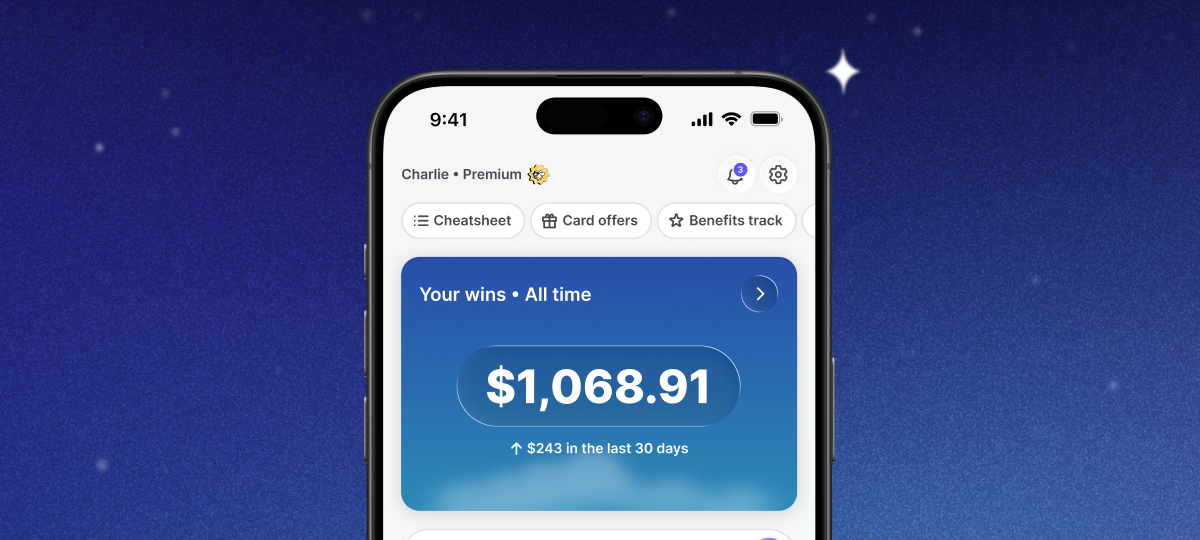
You told us the home page made you do too much of that work yourself. So we rebuilt it. It now opens with what Kudos has earned or saved you, and then tells you the single most valuable thing to do next.
What Is the New Kudos Home Page?
There are two parts.
Your wins is the scoreboard. One number for everything Kudos has earned or saved you, growing over time, with what you added in the last 30 days underneath it.
Relevant for you is the feed. Every opportunity across your wallet gets ranked, and the most valuable one sits first. Not a list of features to go explore. A specific thing, with the amount attached and a button that takes you straight into it.
Nothing new to set up. Just open Kudos.
New here? Kudos tracks the credits and offers across every card in your wallet. See how the Benefits Tracker works.

What Does Your Wins Show?
Most finance apps show you what you spent. This shows you what you got back.
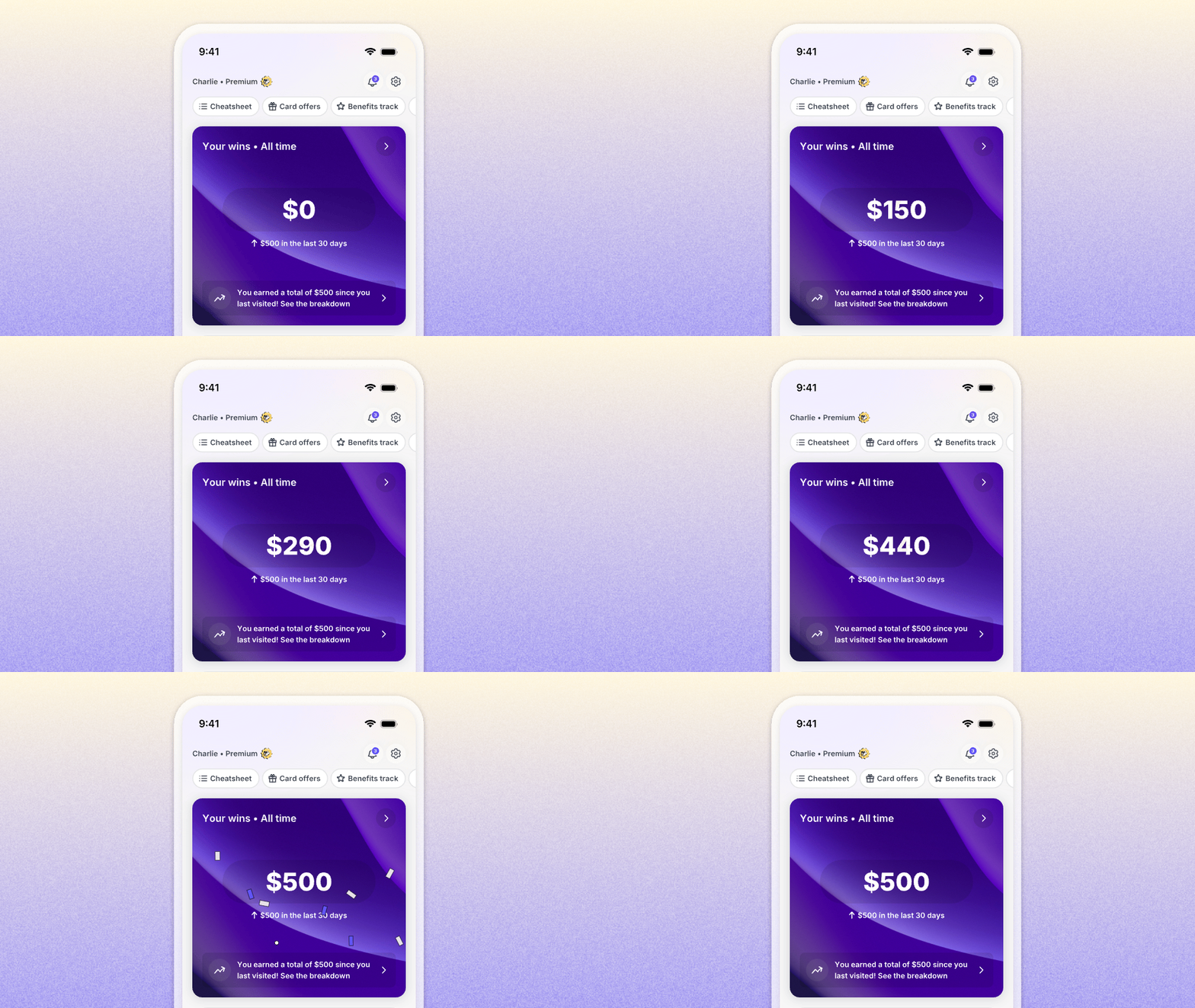
Tap into it and you get the breakdown of where the number came from:
- Rewards and cashback earned
- Benefits and statement credits you used
- Card-linked offers activated or redeemed
- Money saved through bill negotiation
- Progress toward a welcome offer
- Value received against an annual fee
- Purchases made on the card Kudos recommended
- Subscriptions you found, reviewed, or canceled
It keeps updating as data lands, so cashback that posts days after your purchase still finds its way into the total.

The number only counts value Kudos can actually verify. If a card is not connected, Kudos will ask you to connect it rather than guess at what you earned.
Want the cashback side of this to grow faster? Here is how Kudos Boost works.
How Does Kudos Rank What to Do Next?
This is the part that took the longest to get right. Every eligible action competes, and four things decide the order.
What it is worth. How much money, cashback, or avoided loss does this create for you? A $500 travel credit outranks a $125 card-linked offer, which outranks a $10 food delivery credit.
How urgent it is. Are you about to lose it? Expiring credits, offers with a deadline, welcome-offer windows, annual-fee decisions, and free trials about to convert all climb as the clock runs down.
Whether it fits how you shop. A credit at a store you visit every month ranks above one at a store you have never been to.
What you engage with. Dismiss something a few times and Kudos stops surfacing it for a while. Use the Cheatsheet constantly and you will see more best-card recommendations. That learning shapes the order, but it never buries something genuinely valuable or about to expire.
One rule sits above all of it: something specific always beats a generic nudge to try a feature. "Your $75 credit expires in four days" outranks "Check out the Benefits Tracker," every time.
And the ranking is built around what is most valuable to you, not what we would most like you to click.
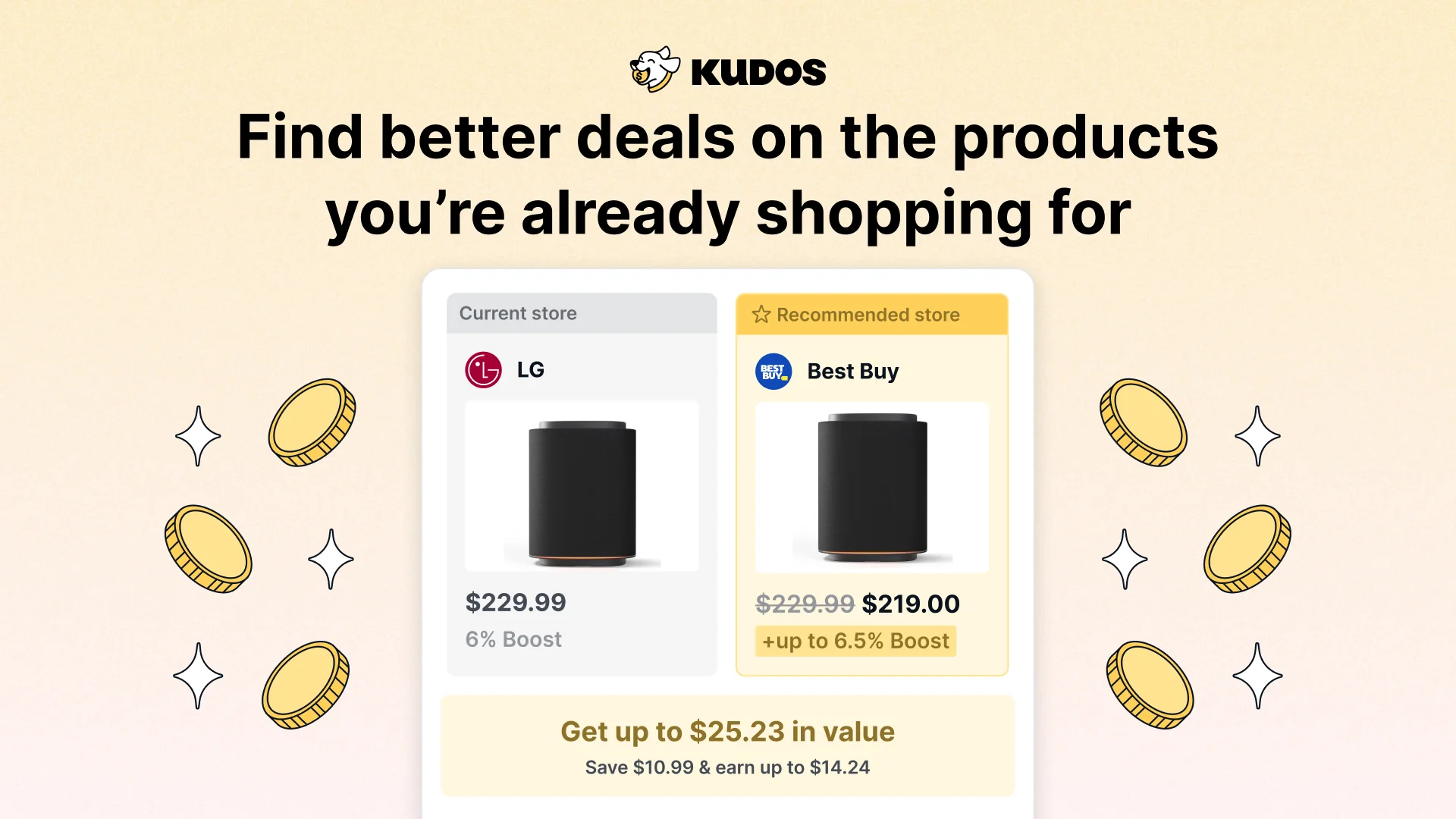
Curious how Kudos picks a card at checkout? See how Kudos finds better deals while you shop.
What Shows Up in Your Feed?
Real examples of what the feed can surface:
- A benefit about to expire. "Your $75 store credit expires in four days. Use it before it resets."
- An offer worth using. An offer on a card you hold, at a store you actually shop, with the value and the deadline attached.
- Offers you have not activated. "You have not activated offers on this card in three weeks."
- Welcome offer progress. "You are $620 away from the bonus, with 18 days remaining."
- A new or changed subscription. "We detected a new $19.99 monthly subscription. Review it now."
- A bill worth negotiating. "Your internet bill increased to $146. Let us try to lower it."
- A limited-time Boost. "Still shopping there? Earn an extra 8% back for the next 24 hours."
- A store that just became a Boost merchant, picked because you already shop there.
- Whether a card is earning its annual fee. Value you have received, value still unused, the fee, and the renewal date.
- Rewards you missed. "Last week you used the best card on 15 of 17 purchases. Here are the two worth a look."
Setup steps show up here too, but one at a time, and they tell you what they unlock rather than just naming the task. "Install the extension so Kudos can flag offers while you shop" instead of "Install the extension."
Ask KudosAI Right From Home
KudosAI now sits on the home page for Premium members. Ask about your cards, your benefits, your offers, and your spending without navigating anywhere, and act on the answer in the same place.
"Which card should I use for groceries?" "What credits have I not used yet?" "What am I paying for that I forgot about?" Ask it to cancel a subscription you are done with and it handles that too.
Why the Home Page Changed
The old home page, Kudos Score included, asked you to process too much. Steps, statuses, to-dos, and a number that moved for reasons that were not always obvious. Sorting out what actually deserved your attention was left to you.
The new home page takes the opposite approach. Fewer items, each one specific, ordered by what it is worth to you. Notifications now come off the same ranked list, so the thing that interrupts you is the thing the feed already decided was most important. Every notification maps to something in your feed, and most feed items never become a notification at all.

What Kudos Premium Adds to Your Feed
The home page is free for everyone. What it can put in front of you depends on how much of your wallet Kudos can see and act on.
On the free plan, your feed leans toward shopping. Boost offers at stores you already use, stores that have just become Boost merchants, a better price on something you are looking at, and the setup steps that unlock more.
Kudos Premium is what powers the rest of the feed. Almost every item that involves your cards rather than your cart traces back to a Premium feature:
- Benefits Tracker is where the expiring-credit items come from. No tracker, no way to know your $75 credit resets on Friday.
- Card-linked offer auto-activation turns "activate your offers" from a feed item into something already done. Premium members get their Amex, Chase, Citi, Bank of America, and Wells Fargo offers activated automatically.
- AI bill negotiation is behind every "your bill went up, let us try to lower it" item.
- Subscription tracking and cancellation is what spots the new $19.99 charge and cancels it on your say-so.
- KudosAI is the ask box on the home page.
- Geolocation Cheatsheet feeds the best-card recommendations for stores you walk into.
Put another way: the ranking engine is only as good as what it can see. Connect more and the feed stops suggesting setup steps and starts naming specific dollars sitting in your wallet.
See everything included in Kudos Premium. It comes with a 90-day savings guarantee: if Premium does not save you more than you paid in your first 90 days, you can request a refund between day 90 and day 120.
Stack It With the Rest of Your Kudos Wallet
The feed is the front door. Here is what it opens into:
- Kudos Boost. Cashback at thousands of stores, on top of your card's own rewards. Free for everyone, with higher rates at some stores for Premium members.
- Better deals while you shop. Kudos checks whether the exact item you are viewing is a better buy somewhere else. Free with the browser extension.
- Best card at checkout at over 2 million stores. Kudos recommends which card in your wallet earns the most for each purchase.
- Benefits Tracker. Every credit and perk across your cards, with progress toward each one.
- Card-linked offer auto-activation. Your offers activated for you, before you shop.
- Subscription cancellation and bill negotiation. Find forgotten charges and lower recurring bills.
- Geolocation Cheatsheet. The best card at the restaurant or store you are standing in.
FAQ
Do I need to set anything up?
No. Open Kudos and the new home page is there. The more cards and accounts you have connected, the more specific your feed gets, because Kudos can see which credits you have actually used.
Is the new home page free?
Yes. Everyone gets the home page, your wins, and a ranked feed. What differs is what the feed can surface. Free feeds lean toward Boost and shopping opportunities, while Premium adds the items that come from your cards: expiring credits, offer activation, bill negotiation, and subscriptions.
Which parts need Kudos Premium?
Benefits Tracker, card-linked offer auto-activation, AI bill negotiation, subscription tracking and cancellation, KudosAI, and the Geolocation Cheatsheet. Kudos Boost and better-deal alerts while you shop are free for everyone.
Why does my feed look different from someone else's?
It is ranked against your wallet, your spending, and your goals. Two people with the same cards can see different top items depending on what is expiring and where they shop.
Can I get rid of something I do not care about?
Yes. Dismiss it. Repeated dismissals tell Kudos to stop surfacing that kind of item for a while.
Does this replace my notifications?
Notifications now come from the same ranked list. Your feed holds everything worth knowing, and only the most valuable or time-sensitive items become a notification.
The Bottom Line
The value in your wallet was always there. The work was in tracking it: which credit resets when, which offer needs activating, which bill crept up.
The new home page does that work and hands you one thing at a time, starting with whatever is worth the most right now.
Open Kudos and see what is at the top of yours.
Unlock your extra benefits when you become a Kudos member



Turn your online shopping into even more rewards


Join over 400,000 members simplifying their finances



Editorial Disclosure: Opinions expressed here are those of Kudos alone, not those of any bank, credit card issuer, hotel, airline, or other entity. This content has not been reviewed, approved or otherwise endorsed by any of the entities included within the post.

.webp)


.webp)