





Kudos has partnered with CardRatings and Red Ventures for our coverage of credit card products. Kudos, CardRatings, and Red Ventures may receive a commission from card issuers. Kudos may receive commission from card issuers. Some of the card offers that appear on Kudos are from advertisers and may impact how and where card products appear on the site. Kudos tries to include as many card companies and offers as we are aware of, including offers from issuers that don't pay us, but we may not cover all card companies or all available card offers. You don't have to use our links, but we're grateful when you do!

Is Upside App Worth It? 2026 Cash Back Review
September 27, 2026
.webp)


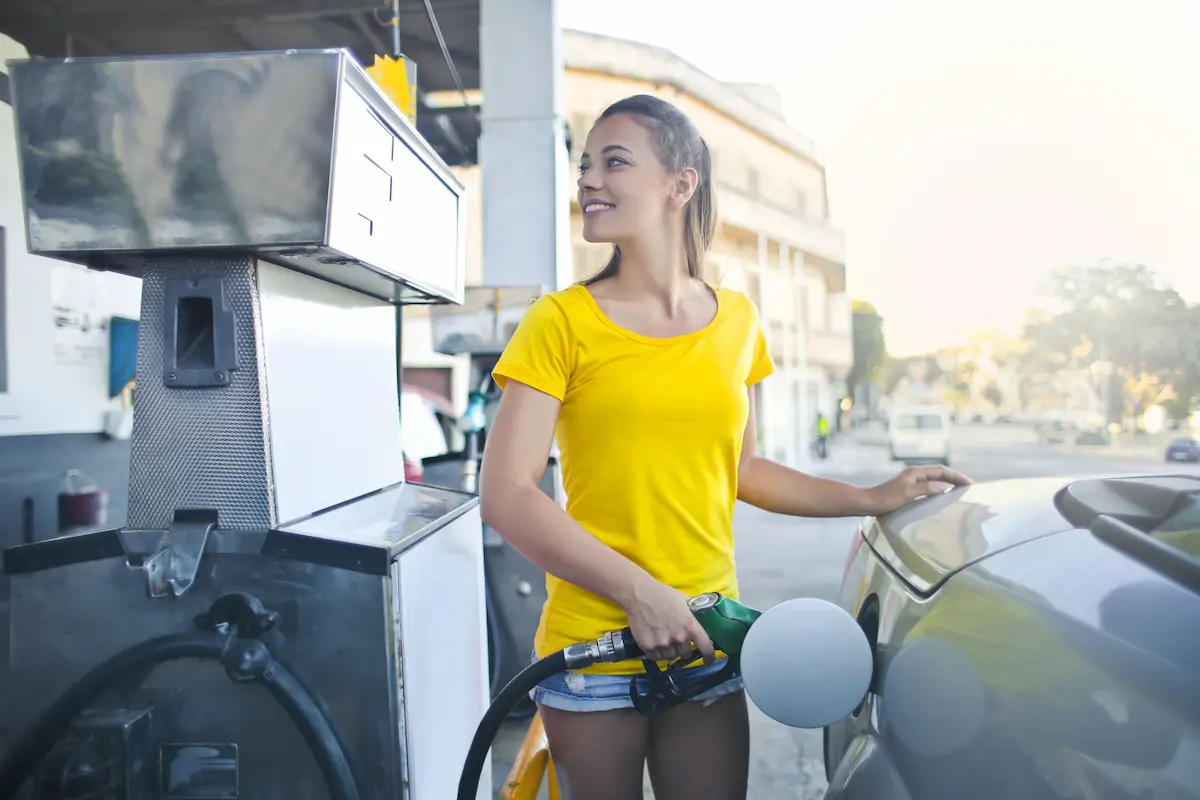
The Upside app promises cash back on gas, restaurants, and groceries just for opening the app before you check out. It sounds like free money for something you're already buying. The real answer is more nuanced: the Upside app can be worth it, but only if you know where it actually pays off and where it quietly costs you more.
Here's what Upside actually is, how the Upside cash back app works, and whether it deserves a spot on your phone.
How Upside Works
Upside is a cash back app that partners with select gas stations, restaurants, and grocery stores to offer limited-time cash back deals. The process is simple:
- Open the app and find a deal near you
- Claim the offer before you pay
- Make your purchase with the card linked to your account
- Confirm you paid with that card
Once your purchase is verified, usually through the card you have linked rather than requiring a photo of your receipt, the cash back lands in your account. You can withdraw it once your balance hits a small threshold, often around $10 for a first payout.
The upside (no pun intended) is that these deals stack with your existing credit card rewards. If your card already earns cash back on gas or dining, Upside's payout comes on top of that, not instead of it.

Is Upside Worth It for Gas? The Catch: Higher Prices Can Cancel Out the Discount
This is where the Upside app gets a mixed reputation, and it's the single most important thing to understand before downloading it.
The gas stations offering the biggest Upside discounts aren't always the cheapest gas stations to begin with. It's common to see a station advertise a 10 to 15 cent per gallon discount through Upside, only to find that station's base price is already 25 to 50 cents higher than a nearby discount station like Costco, Sam's Club, or a regional chain.
In other words, Upside can hand you a discount on an inflated price. You end up paying more overall than if you'd just filled up somewhere cheaper without using the app at all.
This isn't universal. Deals vary heavily by region, and some areas see genuinely strong per-gallon cash back, in the 50 to 60 cent range in some cases. But the lesson holds everywhere: always compare Upside's discounted price against the cash price at your usual station before you commit. Don't assume a cash back percentage automatically means savings.

Where Upside Actually Shines: Restaurants
Gas is the app's most talked-about feature, but restaurant deals tend to be where Upside delivers the most consistent value. Cash back rates at restaurants, including regional chains and local spots, commonly range from 10 to 40 percent, often capped around $10 per transaction.
If you already eat regularly at a specific chain in your area, whether that's a coffee shop, a fast food spot, or a local restaurant, checking Upside before you order is close to a free win since you're not changing your behavior at all, just adding cash back to a purchase you were already making.
Grocery Store Deals Are the Weakest Category
Upside advertises grocery store partnerships, but coverage is thin. Regional and independent grocery chains occasionally participate, but major national grocery chains are largely absent, and many users find no participating stores in their area at all. If grocery savings are your main motivation for downloading the app, temper your expectations.
Real Numbers: What Users Actually Save
Reported results vary widely depending on how often someone drives, where they live, and how consistently they check the app before every purchase:
- Light users report modest totals, sometimes $30 to $50 over a year
- Heavier users, especially those who drive frequently for work or side gigs like delivery driving, report totals in the $200 to $400+ per year range
- Multi-year users who stay consistent have reported cumulative totals over $1,000 across several years
The pattern is clear: Upside rewards frequency and consistency. Someone who drives 30+ miles a day and fills up regularly will see meaningfully more value than someone who drives occasionally and forgets to check the app.
Who Should Use Upside
Upside makes the most sense if:
- You drive frequently for work, delivery gigs, or a long commute
- You're not particularly loyal to discount gas chains like Costco or Sam's Club, and are comparing against standard-priced stations anyway
- You already have a cash back credit card and want to stack an extra layer of savings
- You eat at chains or local spots that show up in the app's restaurant deals

Who Should Skip It
Upside is probably not worth the hassle if:
- You already fill up at Costco, Sam's Club, or another consistently cheap gas station, since Upside's discounted prices are usually still higher
- You're chasing meaningful grocery savings, since coverage is limited
- You don't want another app competing for your attention at checkout, and the small payouts (often just pennies per gallon) don't feel worth the friction to you
Upside vs. Kudos: How Do They Actually Compare?
Upside and Kudos solve different problems, even though they both promise to save you money on purchases you're already making.
Upside finds limited-time cash back deals at specific gas stations, restaurants, and grocery stores. It's deal-based: the savings only exist where a participating merchant happens to be running an offer, and those offers can vary wildly by location and change day to day.
Kudos works differently. Instead of hunting for one-off deals, it's built to be more of a full financial companion than a single-purpose discount app. On the free side, it looks at the cards already in your wallet and tells you which one to use at checkout to maximize points or cash back, automatically activates card offers you'd otherwise forget about, and surfaces Boost cashback at 15,000+ partnered stores.
Premium members get even more: 1.25x the standard Boost rate on every eligible purchase, a Benefits Tracker that shows every credit and perk across your cards with real-time progress and redemption instructions, AI bill negotiation that deals directly with your phone, internet, or security provider on your behalf, a Location Cheatsheet that tells you your best card wherever you physically are, subscription tracking with one-tap cancellation, and Kudos AI, which you can ask directly about your spending, subscriptions, or which offers are about to expire. Rather than adding a new discount layer on top of your day, it's trying to manage the whole picture so you're not the one keeping track of it.
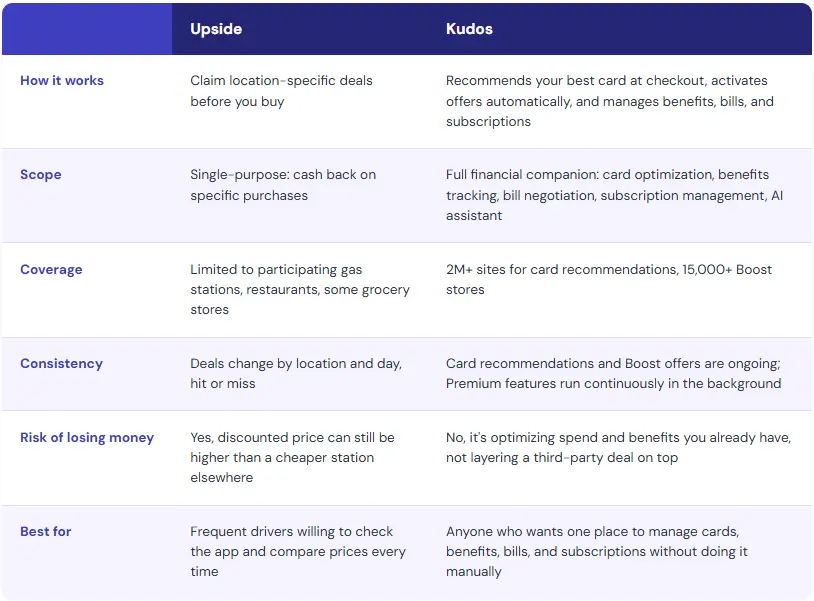
The two aren't mutually exclusive. Someone could reasonably use Kudos to make sure they're using the right card, catching Boost cashback, tracking benefits, and letting an AI agent negotiate their bills, while also glancing at Upside for the occasional gas or restaurant deal, as long as they're doing the price comparison Upside requires every time.
Where Kudos pulls ahead is scope as much as consistency. Upside is a discount finder for a narrow set of purchases. Kudos is trying to be the single place that handles your cards, your benefits, your bills, and your subscriptions, so there's less for you to track manually in the first place, not just a better deal at checkout. If you want to see how much you might already be missing on the cards in your wallet, our guide to maximizing credit card rewards in 2026 is a good next read.
The Bigger Picture: Stacking Rewards the Right Way
Upside isn't a replacement for a good rewards strategy, it's one more layer on top of one. The real savings come from combining smart tools: a cash back or points-earning credit card for the base rewards, a discount gas retailer or grocery loyalty program for the lowest base price, and an app like Upside only when the math genuinely works out in your favor at that specific location.
That's also where it's worth checking what you're missing elsewhere. Many people are already sitting on card benefits, credits, or offers they aren't using at all, which often add up to more than a few cents per gallon here and there.
Bottom Line
Upside can put a little extra money back in your pocket, especially on restaurant purchases and for frequent drivers. But it is not automatically a discount, and in some cases the "deal" it shows you is actually more expensive than just going somewhere else. Check the math every time, don't let it replace a genuinely cheap gas station or grocery store, and treat it as a small bonus layer rather than a core savings strategy.
Frequently Asked Questions
Does the Upside app really save you money?
Sometimes. Upside can save you money at restaurants fairly reliably, since the cash back is added on top of a normal menu price. At gas stations, it's less reliable: the discounted price is sometimes still higher than a nearby station's regular price, so it's worth comparing before you fill up.
Is Upside safe to use?
Upside requires linking a payment card to verify purchases, similar to other cash back apps like Ibotta or Dosh. Like any app that accesses transaction data, it's worth reviewing the app's privacy policy and deciding whether you're comfortable with that tradeoff in exchange for the cash back.
How much can you realistically earn with Upside?
It depends heavily on how often you drive and how consistently you check the app. Light or occasional users often see modest totals, in the range of $30 to $50 a year. Frequent drivers, especially those doing delivery work or long commutes, have reported totals in the $200 to $400+ per year range.
Is Upside better than a cash back credit card?
They're not really competing tools. A cash back credit card earns rewards on every purchase, everywhere, automatically. Upside only pays out at specific participating locations with active deals. The two stack together, so using a cash back card and Upside at the same time typically nets more than either alone, as long as the Upside deal is actually a good price.
Is Upside worth it if I already use Kudos?
Kudos and Upside solve different problems. Kudos is built to be a full financial companion, handling card recommendations, benefits tracking, bill negotiation, and subscription cancellation automatically, no deal-hunting required. Upside can still be worth checking for the occasional restaurant or gas deal on top of that, as long as you're comparing prices rather than assuming the discount is automatically a good deal.
Join over 400,000 members simplifying their finances
- Maximize card rewards: Earn Kudos Boost rewards when you shop at your favorite stores
- Stay on top of your finances: Monitor your transactions, spend, and credit score
- Discover new credit cards: Get personally matched for a card that will earn you the most based on your spend history
Save up to $70 when you join Kudos with code GET70 — $50 off Kudos Premium, plus $20 after your first eligible Kudos Boost purchase of $30+
Unlock your extra benefits when you become a Kudos member



Turn your online shopping into even more rewards


Join over 500,000 members simplifying their finances



Editorial Disclosure: Opinions expressed here are those of Kudos alone, not those of any bank, credit card issuer, hotel, airline, or other entity. This content has not been reviewed, approved or otherwise endorsed by any of the entities included within the post.

.webp)

.webp)